
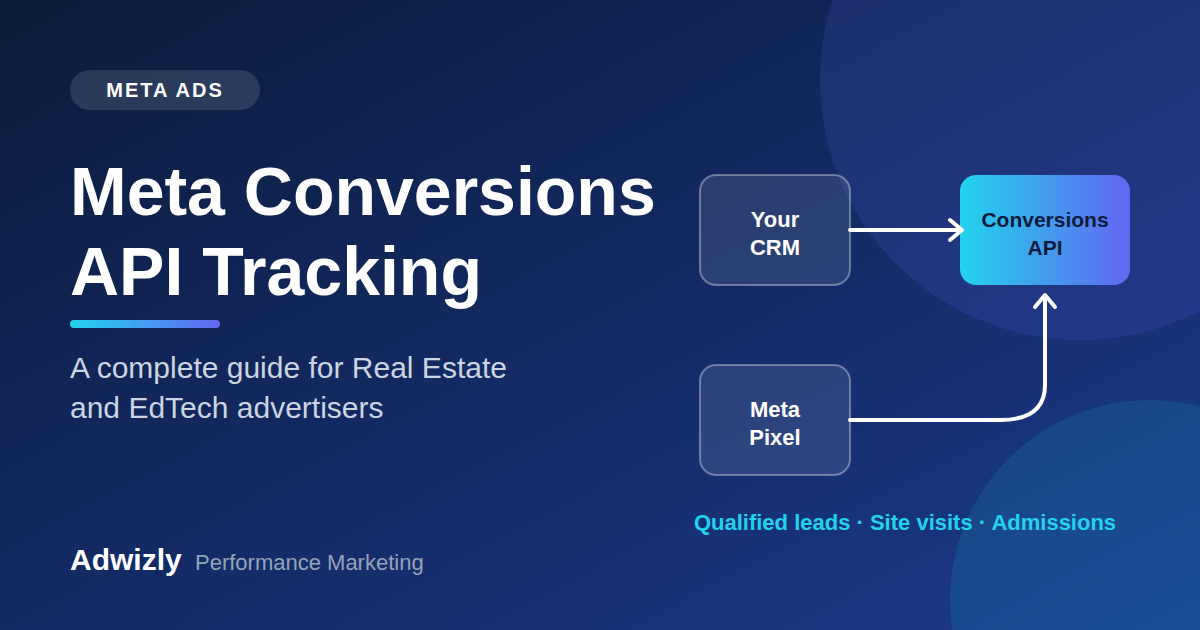
If you run Meta ads for a real estate project or an education brand, you have probably seen this: Ads Manager shows 120 leads, your CRM shows 85, and your sales team says only 15 were worth calling. Budgets are rising, but nobody can say with confidence which campaign is actually producing site visits, admissions or bookings.
In most cases the problem is not creative or targeting. It is tracking.
Browser-based tracking through the Meta Pixel alone no longer captures the full picture. Meta's Conversions API (CAPI) was built to fix this by sending conversion data directly from your server or CRM to Meta. For industries with long sales cycles and high-value conversions, such as real estate and EdTech, it is one of the most important upgrades you can make.
In this guide, we explain what Meta Conversions API tracking is, why it matters, how to set it up, and how a real estate digital marketing agency or performance marketing agency uses it to improve lead quality and lower acquisition costs.
What Is the Meta Conversions API?
The Meta Conversions API is a server-to-server connection that lets you share customer actions with Meta. These actions, called events, can include page views, leads, add-to-carts, purchases, form submissions, calls, site visit bookings, admissions and more.
There are two ways Meta can receive your conversion data:
- Meta Pixel (browser-side): A piece of code on your website that fires when a visitor takes an action. It depends on the user's browser, cookies and device settings.
- Conversions API (server-side): Your server, CRM or marketing platform sends the event directly to Meta. It does not depend on the browser.
Meta recommends using both together, often called a redundant setup. The Pixel captures rich browser signals, while CAPI fills the gaps the Pixel misses. Meta then combines and deduplicates the two streams.
Why Pixel-Only Tracking Is Failing Advertisers
Over the last few years, the way online data is collected has changed. Several factors now cause the Pixel to under-report conversions:
- Ad blockers and privacy-focused browsers that block tracking scripts
- Apple's App Tracking Transparency (ATT) and iOS privacy changes that limit cross-app and cross-site data
- Browser cookie restrictions, especially in Safari and Firefox
- Slow-loading pages and closed tabs, where the user leaves before the Pixel fires
- Events that happen off-site, such as a phone call, a WhatsApp conversation or a site visit that the browser never sees
When conversions go unreported, Meta's algorithm learns from a smaller and less accurate set of data. It then struggles to find the right audience, your cost per lead rises, and your reports stop matching reality.
Why Conversions API Matters Even More for Real Estate and EdTech
Selling a product online in a single session is simple to track. Real estate and education are not like that. The journey is long, involves several touchpoints and often finishes offline.
The real estate journey
A typical homebuyer may click an ad, submit an enquiry form, speak to a sales executive, visit the site, compare options for weeks and finally book a unit. The most valuable events, such as a qualified lead, a site visit or a booking, happen in your CRM or on the phone, not on your website.
Without CAPI, Meta only ever sees the form fill. It cannot tell the difference between a serious buyer and a casual browser, so it keeps optimizing for more form fills, not better buyers.
The EdTech and education journey
A student or parent may see an ad, download a brochure, attend a demo class or counselling session, compare institutes and enrol days or weeks later. The decisive events, such as counselling completed, application submitted or admission confirmed, again live in your CRM.
CAPI lets you feed those downstream outcomes back to Meta so the algorithm learns what a real admission looks like.
Key Benefits of Meta Conversions API Tracking
1. More complete and accurate conversion data
Server-side events are not blocked by browsers or ad blockers, so fewer conversions go missing. You get a more reliable picture of how your campaigns are performing.
2. Better optimization and lower cost per result
Meta's delivery system depends on conversion signals. When it receives more complete and higher-quality signals, it can find more people who resemble your real customers. Over time this can improve efficiency, though results vary by account, budget and creative.
3. Optimize for lead quality, not just lead volume
By sending CRM stages back to Meta, such as Qualified Lead, Site Visit Done or Admission Confirmed, you can train campaigns toward the leads that matter. Meta's Conversion Leads optimization is designed for this: it uses the post-lead outcomes you share to find people more likely to become quality leads.
4. Offline conversion tracking
Phone calls, in-person visits, WhatsApp chats and offline bookings can all be reported back to Meta, so your ad spend is credited for the full journey.
5. Stronger audiences and lookalikes
Feeding high-quality customer events into Meta helps you build better custom audiences and lookalike audiences based on actual buyers or enrolled students, not just anyone who filled a form.
6. Improved privacy resilience
CAPI gives you a more durable foundation as privacy rules continue to evolve, provided you handle consent and data responsibly.
How Meta Conversions API Works
Here is the flow in simple terms:
- A person clicks your Meta ad and lands on your website or lead form.
- They take an action, for example submitting an enquiry.
- Your website server, CRM or tag manager sends that event to Meta, along with identifying parameters (like a hashed email or phone number).
- Meta matches the event to a user and attributes it to the right ad, ad set and campaign.
- Later, when the lead progresses in your CRM (qualified, visited, booked), you send those updated events to Meta as well.
Deduplication: Preventing Double Counting
If the Pixel and CAPI both report the same action, Meta could count it twice. Deduplication prevents this.
To make it work:
- Use the same event name on both the browser and server events (for example, Lead).
- Pass the same event_id with both events.
Meta uses the event name and event ID to recognize the duplicates and keep only one. Meta's deduplication has a limited time window, so both versions of the event should arrive close together.
Missing or mismatched event IDs are one of the most common causes of inflated conversion numbers.
Event Match Quality (EMQ): The Score That Matters
Inside Meta Events Manager, each event shows an Event Match Quality score. It reflects how well the customer information you send can be matched to a Meta account. A higher score generally leads to better attribution and optimization.
To improve your EMQ, send as many relevant customer parameters as you can collect with proper consent:
- Email address (hashed)
- Phone number (hashed)
- First and last name (hashed)
- City, state and zip or PIN code
- Client IP address and user agent
- Facebook click ID (fbc) and browser ID (fbp)
- External ID (your own customer or lead ID)
For lead generation businesses, phone number and email are the strongest signals, so make sure your forms capture them correctly and in a clean format.
Ways to Set Up Meta Conversions API
The right method depends on your website, CRM and technical resources.
1. Partner integrations
Platforms such as Shopify, WordPress, WooCommerce and several CRMs offer built-in CAPI connections. This is the fastest route and works well for simpler setups.
2. Conversions API Gateway
A managed option that lets you host a CAPI setup with limited coding. It is a reasonable choice for teams without dedicated developers.
3. Server-side Google Tag Manager
A flexible and popular approach for agencies. Events are collected through a server container and forwarded to Meta (and other platforms) with more control over data.
4. Direct API integration
Developers send events straight to Meta's API from your backend or CRM. This offers maximum flexibility and is often the best choice for real estate and education businesses that want to send CRM stage updates back to Meta.
5. CRM-based Conversions API integration
Many CRMs, including those commonly used in real estate and education, support sending lead status changes to Meta. If your CRM supports it, this is often the most practical way to enable quality-based optimization.
Step-by-Step: How to Set Up Meta Conversions API in Events Manager
Here is the exact flow we follow when we set up Conversions API for a real estate or education client, using the screens you will see in Meta Events Manager.
Step 1: Open your dataset and start the setup
Open Events Manager, select your dataset (Pixel) and stay on the Overview tab. Under Send events from a server, click Set up Conversions API.
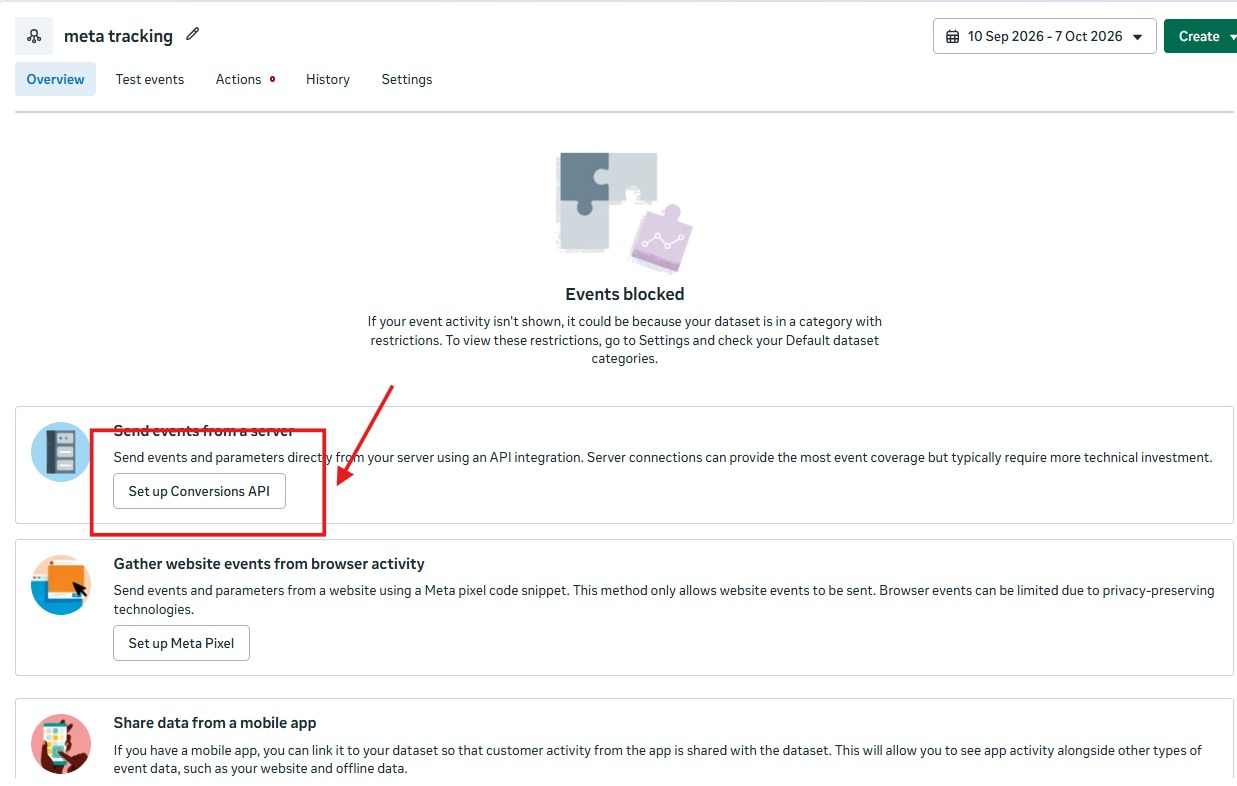
If Overview shows an "Events blocked" message, open Settings and check your dataset's default categories and restrictions before you continue.
Step 2: Choose your setup method
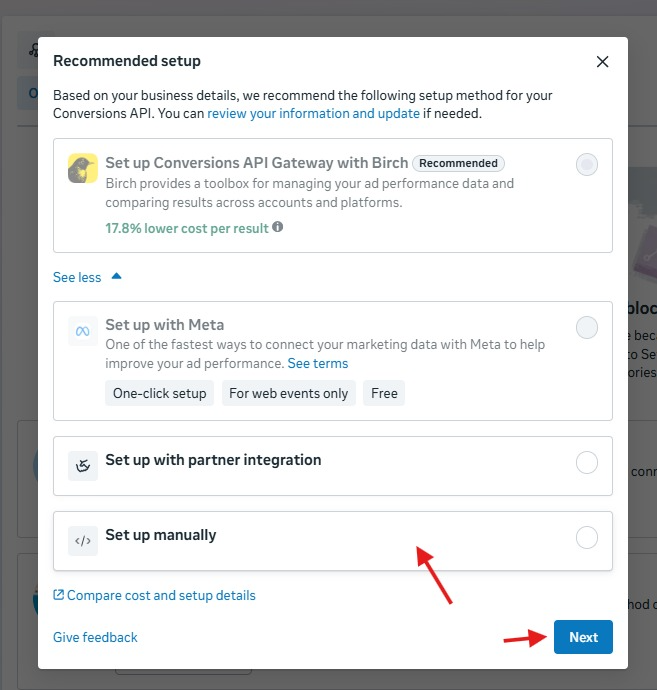
Meta suggests a method based on your business details. You will usually see these options:
- Conversions API Gateway with a partner: a managed setup, often shown as recommended
- Set up with Meta: one-click and free, but for web events only
- Set up with partner integration: use your platform's or CRM's built-in connection
- Set up manually: your developer sends events through the API
For lead generation businesses that want to send CRM outcomes such as qualified leads or site visits, partner integration or manual setup gives the most control. Select your option and click Next.
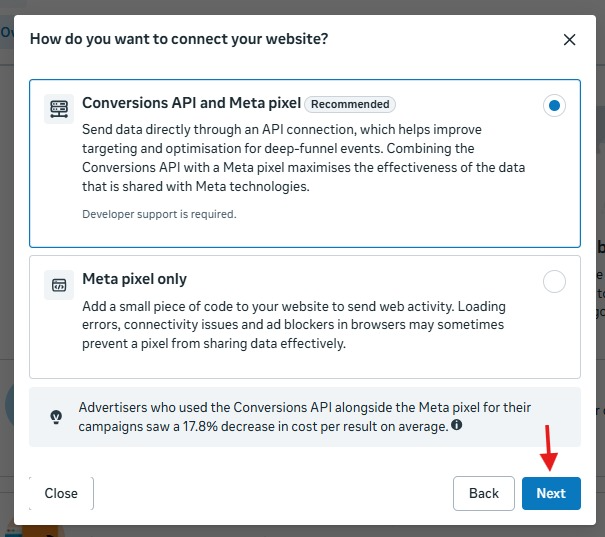
Step 3: Connect with both Conversions API and the Meta Pixel
Choose Conversions API and Meta pixel, which Meta marks as recommended. Meta notes that developer support is required for this option. On this screen, Meta also states that advertisers who used Conversions API alongside the Pixel saw an average 17.8% decrease in cost per result. Treat that as Meta's reported average, not a guarantee for your account.
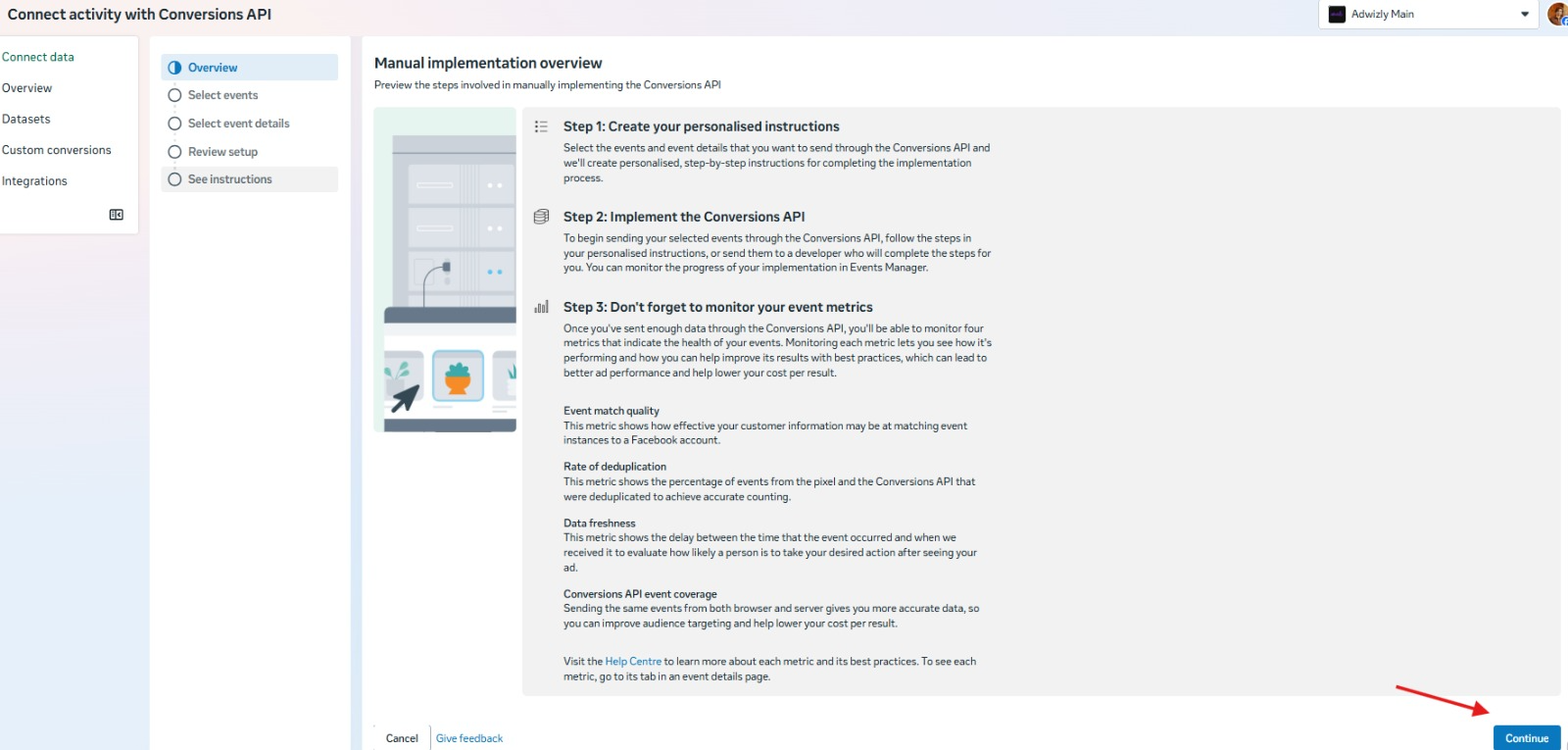
Step 4: Review the manual implementation overview
Meta then shows a three-step overview:
- Create your personalised instructions by selecting the events and event details you want to send.
- Implement the Conversions API by following those instructions yourself or sending them to your developer.
- Monitor your event metrics once enough data is flowing.
Meta lists four metrics to watch: event match quality, rate of deduplication, data freshness and Conversions API event coverage. Click Continue to move on.
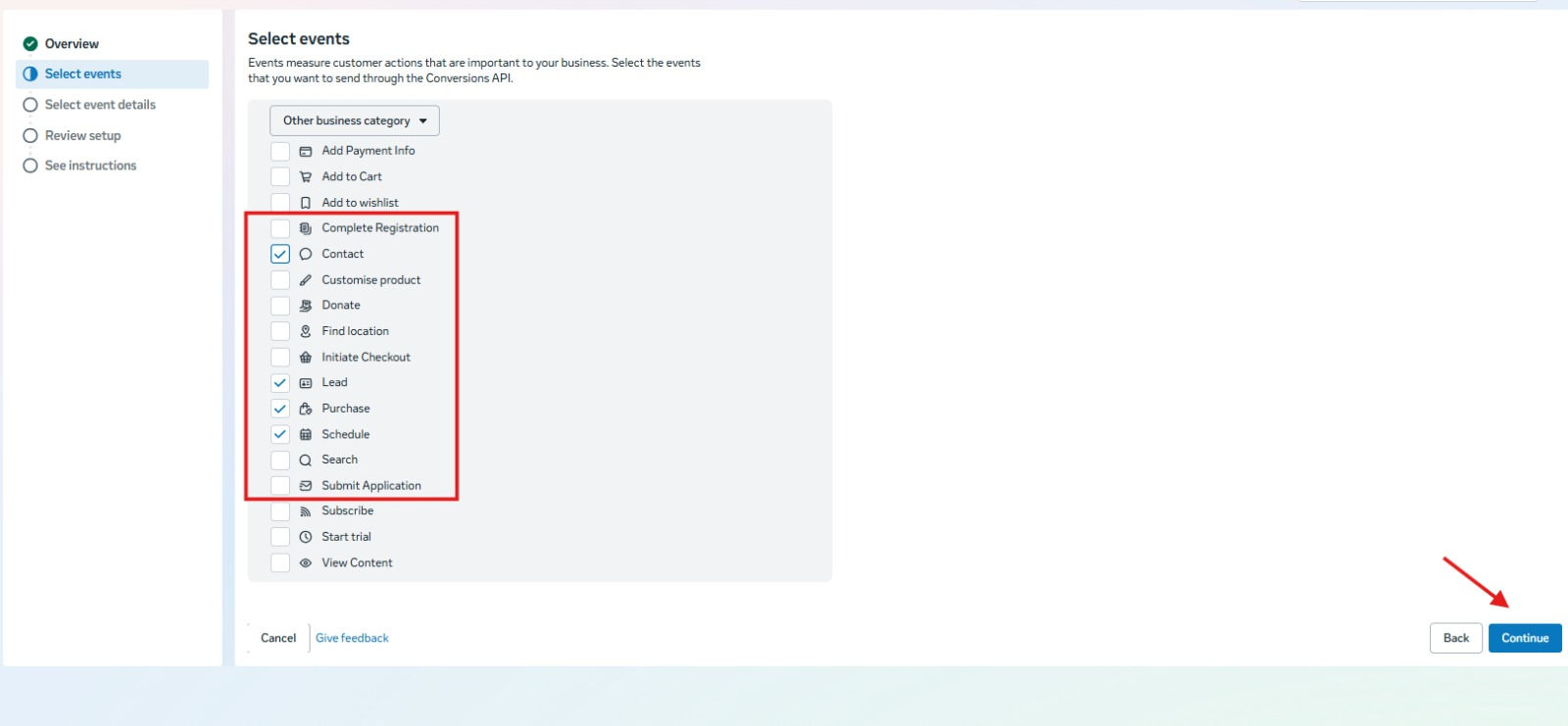
Step 5: Select the events you want to send
On the Select events screen, tick only the events you will genuinely send from your server or CRM. For lead generation, these are the most useful:
Click Continue after selecting your events.
Step 6: Add event details, review and get your instructions
The remaining steps in the left menu are Select event details, Review setup and See instructions. Choose the parameters you will send with each event, such as email and phone, review your setup and then use the personalised instructions Meta generates. Share them with your developer or your agency to complete the integration. Set up deduplication here by sending the same event name and event_id from the Pixel and the server.
Step 7: Test and monitor
Use the Test events tab to confirm that your events arrive and deduplicate correctly. After that, check Overview and Diagnostics regularly for match quality, deduplication rate, data freshness and event coverage.
Step 8: Send CRM outcomes back to Meta with Litchoo
The setup above sends events from your website. The real gains for real estate and EdTech come from sending what happens after the lead, and that is where a CRM comes in. At Adwizly we use Litchoo, our own workflow and CRM platform, to connect the two.
The flow looks like this:
- Create or select the client project in Litchoo, so the intake workflow and tracking sit together for that client.
- Store incoming leads in the CRM. A Facebook Lead Ads trigger feeds a CRM contact node that maps phone, name and email, and the workflow is set live.
- Record real outcomes. After qualification, your sales team moves the contact through stages such as Lead, Prospect, Qualified, Negotiation and Customer.
- Configure Meta lead feedback. Select the project, connect your Meta credential and dataset or Pixel ID, map your Qualified and Converted stages and save. You can add a Meta test event code to verify delivery before going live.
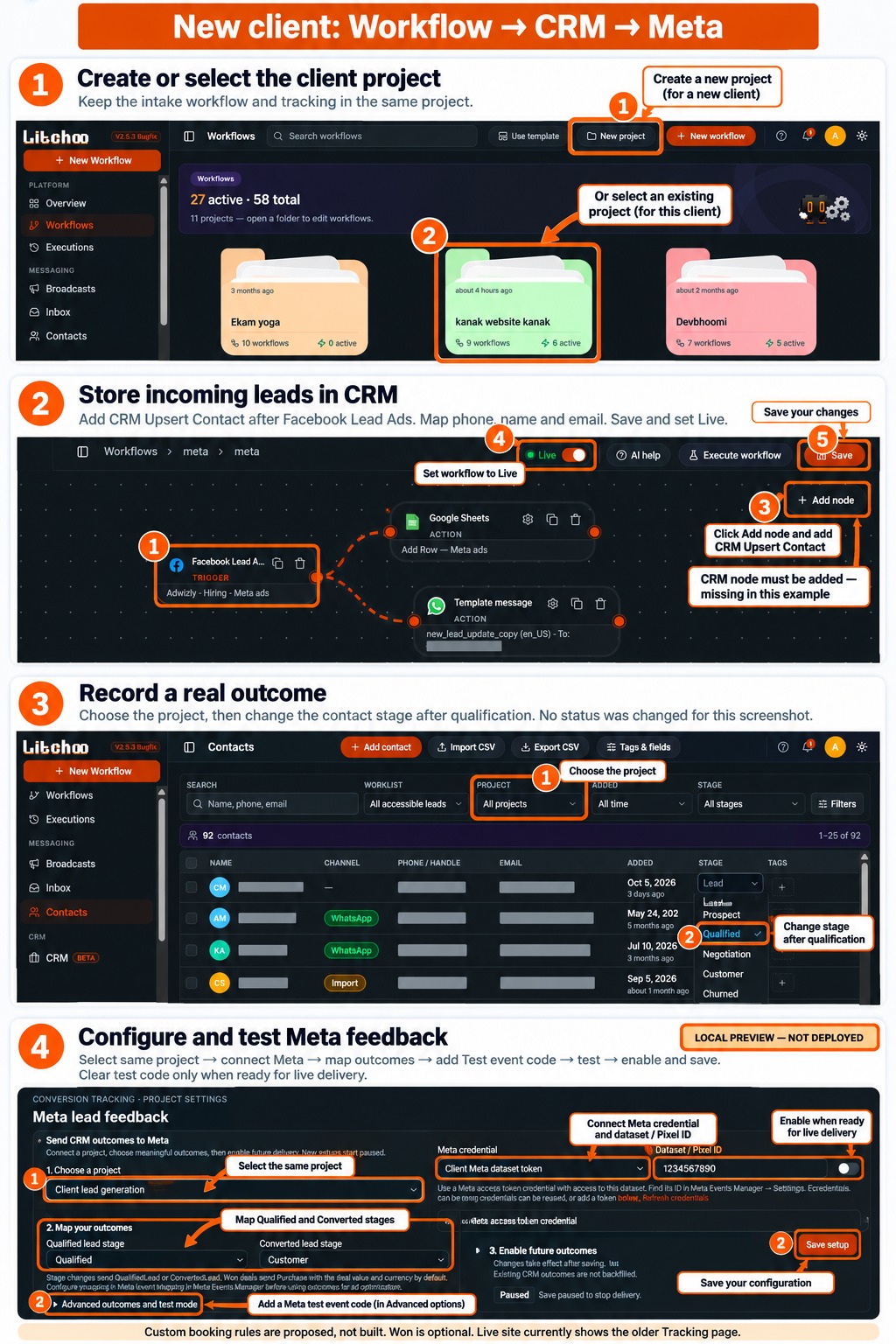
Once these outcomes reach Meta, your campaigns can learn which leads become qualified and which become customers, not just which ones filled a form.
How to Use CAPI Data to Improve Your Meta Ad Campaigns
Setting up CAPI is only half the work. The real gains come from using the data well.
Switch optimization toward quality
Once you have enough downstream events flowing in, test campaigns optimized for quality outcomes rather than raw lead volume. Expect an initial learning phase and a possible rise in cost per lead, balanced by better cost per qualified lead or per site visit.
Evaluate campaigns by business outcomes
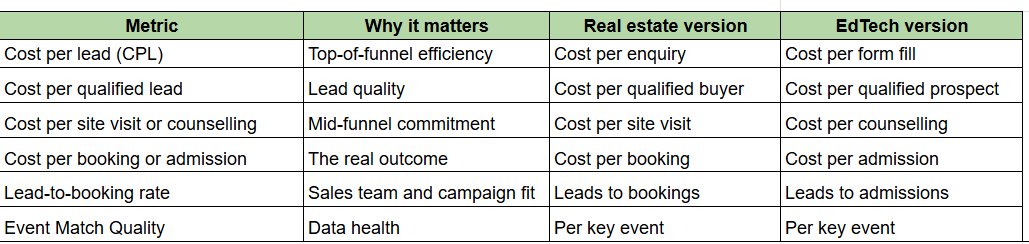
Stop judging campaigns only by cost per lead. Track cost per qualified lead, cost per site visit, cost per booking (real estate) or cost per counselling, cost per application, cost per admission (EdTech).
Build smarter audiences
Create custom audiences from qualified leads, site visitors and enrolled students. Use them to build lookalikes and to exclude people who have already converted.
Feed creative decisions with real data
When you can see which creatives and messages drive qualified leads, not just cheap ones, you can double down on what actually works.
Common Conversions API Mistakes to Avoid
- No deduplication, which inflates results and confuses optimization
- Inconsistent event names between Pixel and server
- Sending unhashed personal data when hashing is required
- Low EMQ because phone numbers and emails are missing or badly formatted
- Sending delayed events, since conversions should be sent as close to real time as possible
- Only tracking the top of the funnel and never sending CRM stage events
- Ignoring consent and privacy requirements that apply in your region
- Never checking Diagnostics after the initial setup
Conversions API vs Meta Pixel: Quick Comparison
Does CAPI Replace the Pixel?
No. Meta's recommended approach is to run both. The Pixel captures browser-side signals and CAPI adds reliability and server-side or offline data. Together, with proper deduplication, they give the most complete view.
Deep Dive: Designing Your Event Funnel
Before any developer writes a line of code, decide which events you will send and what each one means. A clear event map is the single biggest factor in whether your CAPI setup improves results.
Real estate event map
EdTech event map
A few rules keep the map useful:
- Use standard events where one fits. Meta's standard events (Lead, Schedule, Contact, Submit Application, Purchase) work better with its optimization tools than custom names.
- Add custom events only for stages with no standard match, and name them consistently.
- Send value where it makes sense. For bookings and admissions, passing the transaction value and currency (INR) helps Meta understand which conversions are worth more.
- Send events in the order they happen, as close to real time as you can. Delayed events weaken optimization.
Deep Dive: What a Server Event Looks Like
A Conversions API event is a structured request sent to Meta's Graph API for your dataset. Here is a simplified example of a Lead event, using placeholder values:
{
"data": [
{
"event_name": "Lead",
"event_time": 1760000000,
"event_id": "lead_84721",
"action_source": "website",
"event_source_url": "https://www.example.com/project-landing-page",
"user_data": {
"em": ["<sha256 hashed email>"],
"ph": ["<sha256 hashed phone>"],
"client_ip_address": "203.0.113.10",
"client_user_agent": "Mozilla/5.0 ...",
"fbc": "fb.1.1760000000000.AbCdEf",
"fbp": "fb.1.1760000000000.123456789"
},
"custom_data": {
"currency": "INR",
"value": 0
}
}
]
}
The key fields:
- event_name: the event, such as Lead or Purchase.
- event_time: when it happened, as a Unix timestamp.
- event_id: the unique ID used for deduplication. It must match the Pixel's event ID for the same action.
- action_source: where the action happened. Website events use website. CRM-stage events sent later are typically sent as system-generated or similar, so check Meta's current documentation for the right value for your case.
- user_data: the customer information used for matching.
- custom_data: extra details such as value and currency.
Your developer will send this to your dataset's events endpoint using an access token generated in Events Manager. Always confirm the current API version and field requirements in Meta's developer documentation, because they change.
Deep Dive: Customer Information Parameters and Hashing
Meta matches events to people using the customer information you send. Better data in means better matching out. Most personal fields must be normalized and then hashed with SHA-256 before sending.
Two practical tips for Indian lead generation:
- Clean phone numbers at the form. Strip spaces, brackets and leading zeros, and add the country code before hashing. Badly formatted numbers are a leading cause of low match quality.
- Capture fbc and fbp at the moment of the click. Store them with the lead in your CRM so you can send them again when later stages are reported.
Deep Dive: Reporting CRM Stages Back to Meta
This is where real estate and EdTech advertisers see the biggest difference. The idea is simple: every time a lead reaches a meaningful stage, tell Meta.
- Store identifiers when the lead arrives. Save the lead's hashed or raw contact details, fbc, fbp, the lead ID and the original event_id in your CRM.
- Define your stages. For example: New, Contacted, Qualified, Site Visit Scheduled, Site Visit Done, Negotiation, Booked.
- Map stages to events. Decide which stage triggers which Meta event, as in the event maps above.
- Send the event when the stage changes. Use the same customer information so Meta can match it to the original lead.
- Keep a consistent definition of "Qualified." If your sales team uses the term loosely, the signal Meta receives will be noisy.
- Review monthly. Compare Meta's reported qualified leads and bookings with your CRM's numbers.
A note on timing: events reported long after the ad click may fall outside Meta's attribution windows, so they may not always be credited to the original campaign in reporting. They can still be valuable as optimization signals, so check Meta's current guidance for how your chosen optimization goal treats delayed events.
Deep Dive: Measuring Success
Once CAPI is live, change how you read your reports.

Expect the following pattern in the first weeks:
- Learning phase. When you change optimization goals, campaigns need time and enough events to stabilize.
- Possibly higher cost per lead. Optimizing for quality can raise CPL slightly while improving cost per qualified lead and cost per booking.
- Better signal over time. More downstream events give Meta more to learn from.
Do not judge the change on cost per lead alone. Judge it on cost per booking or admission over a sensible period.
Deep Dive: A 30-Day Implementation Plan
Week 1
What to do: Audit the Pixel, Events Manager, EMQ and the gap between Meta leads and CRM leads. Define your funnel and event map.
Output: Tracking audit and event map
Week 2
What to do: Choose the integration method. Set up CAPI for website events with deduplication. Fix form data capture (phone, email, fbc, fbp).
Output:Website events live with test events passing
Week 3
What to do: Connect the CRM. Send qualified lead, visit and booking or admission events.
Output:CRM stages flowing to Meta
Week 4
What to do: Verify Diagnostics. Launch a test campaign optimized for quality outcomes. Set up reporting on cost per qualified lead and cost per booking.
Output:Quality-based campaign and a new reporting view
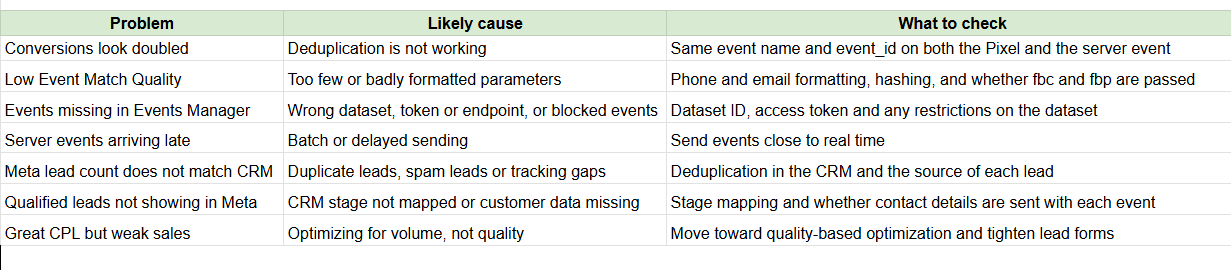
Troubleshooting Common Problems
Privacy, Consent and Data Responsibility
CAPI changes how data travels, not your obligations about that data.
- Collect consent properly. Make sure your forms and privacy policy explain how you collect and share data with advertising platforms.
- Know your local law. In India, businesses handling personal data should understand the Digital Personal Data Protection Act, 2023 and how it applies to them. Speak to a qualified legal advisor for your situation.
- Send only what you need. Do not pass sensitive information that Meta does not allow, and avoid sending more personal detail than your use case requires.
- Hash personal data as required and protect your access tokens like passwords.
- Respect opt-outs and keep your CRM and Meta data in line with what people agreed to.
This is general information, not legal advice.
Why Work With a Specialist Agency for CAPI and Meta Ads
Conversions API setup involves tracking architecture, CRM integration, data hygiene, privacy compliance and campaign strategy. Getting any of these wrong can quietly damage performance for months.
This is where a specialist partner adds value.
For real estate developers and brokers
A focused real estate digital marketing agency understands the full funnel, from the first enquiry to the final booking. At Adwizly, our performance marketing for real estate combines Meta ads, Google ads and proper tracking so that you can see which campaigns bring real buyers and not just form fills.
Whether you are searching for a real estate marketing agency, a real estate ad agency or digital marketing services for real estate, the questions to ask any partner are the same:
- Do they set up Conversions API and CRM tracking?
- Do they report on qualified leads, site visits and bookings, or only on leads?
- Do they optimize campaigns based on those outcomes?
If you are comparing real estate advertising companies, ask them to show how they connect ad data to your sales pipeline. The best real estate digital marketing partners treat tracking as the foundation of every campaign.
If you want to run lead generation on Facebook and Instagram, working with a marketing agency for real estate Meta ads that already has a proven CAPI framework can save you months of trial and error.
For EdTech brands and educational institutes
Education marketing has its own seasonality, intent signals and long decision cycles. A specialist performance marketing agency for EdTech helps you track the journey from enquiry to counselling to admission, and then uses that data to scale what works.
Adwizly's EdTech marketing services include Meta ads, Google ads and conversion tracking designed for lead-driven education businesses. Whether you are a coaching brand, an online learning platform or a school looking for a digital marketing agency for schools, accurate tracking helps you spend on the audiences that actually enrol.
For institutions planning advertisement for educational institutions, the same rule applies: a campaign is only as good as the data behind it. Strong Meta ads for EdTech depend on feeding the algorithm clean signals about who becomes a student.
Don't forget Google Ads
Meta is only one part of the picture. Many real estate and education buyers also search on Google when they are ready to act. A dedicated Google Ads agency can capture that high-intent demand, and server-side tracking and offline conversion imports on Google work on much the same principle as Meta's CAPI. Running both channels with consistent, accurate conversion data gives you a clear view of your total return.
Choosing a performance marketing partner
If you are evaluating a performance marketing agency in India or anywhere else, look for a team that:
- Treats tracking and measurement as a core service, not an add-on
- Reports on business outcomes and not vanity metrics
- Is transparent about how conversions are counted
- Can integrate with your CRM and sales process
At Adwizly, our performance marketing services are built around exactly this idea: measurable growth, clean data and accountability for results.
A Simple Conversions API Checklist
Use this quick checklist to review your setup:
- Pixel installed and firing on key pages
- Conversions API connected via a supported method
- Event names consistent between browser and server
- event_id passed for deduplication
- Customer parameters (email, phone, name, location) sent and hashed
- EMQ reviewed for each important event
- CRM stages (qualified, visit, booking or admission) sent back to Meta
- Test Events used to verify setup
- Diagnostics checked weekly
- Consent and privacy requirements reviewed
Frequently Asked Questions
What is Meta Conversions API tracking?
It is a method of sending conversion events directly from your server or CRM to Meta, instead of relying only on the browser-based Pixel. It improves data accuracy and helps with ad optimization.
Is Conversions API better than the Meta Pixel?
They work best together. The Pixel collects browser-side data, while CAPI adds server-side and offline data that the browser misses. Meta recommends using both with deduplication.
Does Conversions API improve ROAS or lower cost per lead?
It can, because Meta receives more complete data to optimize delivery. Results depend on your setup quality, budget, offers and creatives, so it should be seen as an improvement to your data foundation and not a guaranteed fix.
Can I use Conversions API for real estate lead generation?
Yes. It is especially useful for real estate because key outcomes like qualified leads, site visits and bookings happen offline or in the CRM. Sending these events back to Meta helps it find buyers who are more likely to convert.
Can EdTech brands use Conversions API?
Yes. EdTech and education advertisers can send events like counselling completed, application submitted and admission confirmed so that campaigns optimize for actual enrolments.
How long does CAPI setup take?
A basic partner integration can take a few hours, while a full CRM-connected setup with stage-based events usually takes longer because it needs planning, development and testing.
Do I need a developer?
Not always. Partner integrations and gateway options need little or no code. A CRM-based or custom setup is easier with technical help or an experienced agency.
Is Conversions API compliant with privacy laws?
CAPI is a data transfer method, not a compliance solution. You are still responsible for collecting user consent where required and handling personal data according to the laws that apply to you.
Final Thoughts
Accurate data is the foundation of every profitable ad campaign. For real estate and EdTech advertisers, where the most valuable conversions happen long after the first click, Meta Conversions API tracking is no longer a nice-to-have. It is how you give Meta's algorithm the signals it needs to find real buyers and real students.
If your reports do not match your sales, your cost per lead looks fine but your closures do not, or you simply are not sure your tracking is set up correctly, it is time for an audit.
Looking for a partner who treats tracking as seriously as creative? Talk to the Adwizly team about real estate performance marketing, EdTech growth marketing or a full-funnel performance marketing strategy, and let's make every rupee of your ad spend count.